For broadcasting and television networks, YouTube TV includes live TV from 100+ broadcast, cable, and regional sports networks. A separate membership plan is needed aside from the YouTube Premium for this streaming service. YouTube TV is a streaming service that offers live television from more than 100 broadcast, cable, and regional sports networks. It provides unlimited DVR storage, up to six accounts at a single payment, and Spanish language programs via the Spanish Plan or Spanish Plus add-on. Users can enjoy YouTube Originals and trending videos across numerous devices. Let;’s explore the features and how you can record on it for later watch.
How does the YouTube TV Work?
With over 100 channels accessible via live TV streaming, YouTube TV does away with the need for conventional cable or satellite services. Just the YouTube TV app, an internet connection, and a compatible streaming device like a smartphone or Smart TV are needed for users to watch their favorite shows and sporting events.
YouTube TV was first released by Google in 2017 and by 2019 had grown to 210 sites in the US. Though rival streaming services like Sling TV and Hulu Live TV posed competition, YouTube TV grew in popularity and by May 2023 had more than 6 million active users.
Viewers’ content discovery is made easier by the service’s user-friendly interface, cheap pricing, and varied channel roster. Moreover, YouTube TV keeps improving what it offers, especially for sports fans with NFL Sunday Ticket.
It’s important to tell YouTube TV apart from the main Google video-sharing site. They have different functions even if they have the same name. YouTube is mostly used for sharing and viewing videos; YouTube TV concentrates on live TV streaming.
What is the Subscription for the YouTube TV?
The Base Plan for YouTube TV is $72.99 a month, but for the first three months, new subscribers get it for $57.99. Included are more than 100 stations. You can choose specific channels at different costs as well.
The Spanish Plan, at $34.99 a month, offers more than 30 Spanish channels. For individuals who would want Spanish channels in addition to the Base Plan, there is the $14.99/month Spanish Plus add-on. Your location may result in the addition of taxes to your bill.
There isn’t an annual plan offered for YouTube TV; it runs month-to-month. Over a year, the Base Plan comes to $875.88. But your first year will just cost $830.88 because the first three months are discounted to $57.99 per.
While more expensive than other streaming options, YouTube TV provides more than 100 live channels with both national and local content. No further costs apply for cancellations at any time, however partial viewing periods are not eligible for refunds. DVR recordings are preserved and you can pause your membership for up to six months without losing your settings.
Can You Record on YouTube TV?
Yes, you can record on YouTube TV. When you record a program, all upcoming airings and reruns will automatically be saved to your DVR library. Also, you don’t have to worry about running out of space to record as much as you want. For nine months, YouTube TV keeps your recordings online and available to anyone with an internet connection. Any streaming device makes it easy to record your favorite shows, live events, and sports so you can watch them whenever you want.
A major benefit is that your recordings can be kept online for up to nine months. This means that your phone, tablet, or streaming device—or any other device with an internet connection—can access your recorded material. Your recordings are thus always available, even if you swap devices or need to make room on yours.
How to Record on YouTube TV
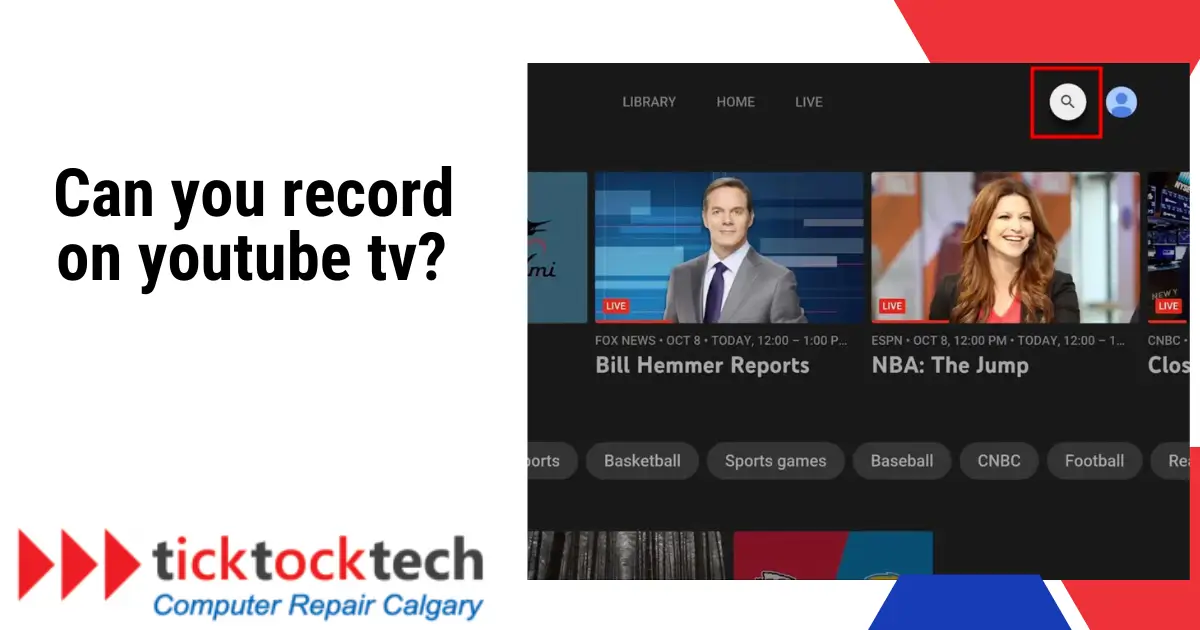
- To record a show on YouTube TV, first launch the app and tap the magnifying glass icon in the upper-right corner. Then, enter the name of the show you want to record and select the plus icon next to it.
- Begin by opening the YouTube TV app, which is accessible on a variety of platforms including smartphones, tablets, and streaming devices. Sign in with your Google account to use the app’s features. Navigate to the magnifying glass icon in the top-right area of the screen.
- Use the on-screen keyboard to enter the name of the show you want to record. When you’ve found the show you’re looking for, tap it to see more information.
- Finally, tap the plus icon (labeled “Add to library”) next to the software name. This action adds the show to your library, ensuring that all current and future episodes are captured. You’ll get a notification verifying the addition to your DVR collection. Note: If the plus icon is not displayed, it means that the program cannot be recorded.
- Alternatively, on a smartphone, tap and hold any software to open a pop-up window. Then, select “Add to Library” to begin the recording process.
How to Record a Live Sport show on Youtube TV
Recording live sports on YouTube TV is straightforward. Follow these steps:
- Search for Your Team or Event: Use the magnifying glass icon to search for your team’s name or the specific event you want to record.
- Select and Add to Library: Choose the desired program from the search results and then add it to your library.
- Customize Recording Settings: You can also adjust recording settings to capture upcoming events like playoffs or championships.
What is the Difference between YouTube TV and YouTube Premium?
The difference between YouTube TV and YouTube Premium is that YouTube TV is a live TV streaming service that allows you to watch cable channels and networks over an internet connection, while YouTube Premium is a subscription service that offers ad-free streaming on YouTube, access to YouTube Originals, and a YouTube Music Premium subscription.
YouTube TV includes about 90 channels across various categories, including entertainment, lifestyle, news, and sports, while YouTube Premium includes ad-free streaming, background play, and offline downloads on YouTube, as well as access to YouTube Originals and YouTube Music Premium. The pricing for YouTube TV starts at $64.99 per month, while YouTube Premium is $11.99 per month.
If you have both a YouTube Premium and a YouTube TV subscription, you may watch your favorite YouTube videos on YouTube TV without being interrupted by advertising. Ads will still appear on live and taped television shows.
Conclusions
YouTube TV is a streaming service that offers live television from over 100 broadcast, cable, and regional sports networks. Users can record their favorite shows, live events, and sports on YouTube TV, with recordings being stored online for up to nine months. The service is separate from the main YouTube platform and requires a separate membership plan. YouTube TV is different from YouTube Premium, which offers ad-free streaming on YouTube and access to YouTube Originals.
FAQs
Which is Better YouTube TV or YouTube Premium?
YouTube TV and YouTube Premium offer different functions, making it difficult to compare them directly. YouTube TV is a live TV streaming service with over 100 channels, whereas YouTube Premium is a subscription service that includes ad-free access to YouTube content as well as exclusive original shows and movies. As a result, your preferences and needs will determine which alternative is best.
Is Recording on YouTube TV legal?
Recording on YouTube TV is legal. YouTube TV offers a cloud-based DVR solution that allows users to record live television shows for later watching. This function is part of the service’s services and complies with all copyright laws and regulations.